문서 객체 모델(DOM)
DOM은 웹 어플리케이션의 조작 방법을 제공하는 API다. 웹 페이지는 HTML로 정의된 트리 구조를 갖는다. DOM은 이를 관리하는 방법이다.
컴포넌트 기반 애플리케이션
렌더링 함수
순수 함수로 렌더링한다는 것은 DOM 요소가 애플리케이션의 상태에만 의존한다는 것을 의미한다.
view = f(state)
투두리스트 앱을 만들었다. 책과 같이 ToDoMVC를 사용하지는 않고 좀 더 작은 뷰를 만들었다.
접근이 필요한 요소에는 클래스 속성을 부여한다.
<html>
  <head>
    <title>todos</title>
  </head>
  <body>
    <section class="todoapp">
      <header>
        <h1>todos</h1>
        <input class="new-todo" placeholder="할 일 적기" autofocus>
      </header>
      <section class="main">
        <ul class="todo-list"></ul>
      </section>
      <footer class="footer">
        <span class="todo-count"></span>
        <ul class="filters">
          <li><a href="#/">전체</a></li>
          <li><a href="#/active">미완료</a></li>
          <li><a href="#/completed">완료</a></li>
        </ul>
        <button class="clear-completed">완료 삭제</button>
      </footer>
    </section>
    <script type="module" src="index.js"></script>
  </body>
</html>
저자는 faker-js를 사용하지만 간단한 예제를 위해 서버에서 받는 데이터를 단순 가정했다.
const mockTodos = [
  {
    id: '1',
    text: '빨래 널기',
    completed: false,
  },
  {
    id: '2',
    text: '분리수거 하기',
    completed: false,
  },
  {
    id: '3',
    text: '헬스장 가기',
    completed: true,
  }
]
fetchTodos()는 할 일 목록을 받아오는 API 호출 함수라고 하자.
const fetchTodos = () => mockTodos;

const state = {
  todos: fetchTodos(),
  filter: 'All'
}
렌더링 함수는 requestAnimationFrame()를 사용한다. 후술할 appView()를 통해 기존 뷰를 새로운 뷰로 대체한다.
const app = document.querySelector('.todoapp');

window.requestAnimationFrame(() => {
  const newApp = appView(app, state)
  app.replaceWith(newApp)
})
- replaceWith(): 이 메서드는 특정 요소를 새로운 요소로 대체한다.
- requestAnimationFrame():
requestAnimationFrame()는 다음 리페인트가 이벤트 루프에 스케쥴링되기 직전에 실행될 콜백을 브라우저에게 알린다. 이 메서드를 사용하면 메인 스레드를 차단하지 않고 브라우저 렌더링 성능에 최적화된 함수 호출이 가능하다.
appView()는 갱신된 요소를 반환한다. targetElement의 list, counter, filters를 갱신하고 모든 내용을 대체한다.
const appView = (targetElement, { todos, filter: currentFilter }) => {
  const element = targetElement.cloneNode(true)

  // get elements
  const list = element.querySelector('.todo-list')
  const counter = element.querySelector('.todo-count')
  const filters = element.querySelector('.filters')

  // new list
  const newList = list.cloneNode(true);

  newList.innerHTML = todos.map(({ text, completed }) => {
    return `
      <li ${completed ? 'class="completed"' : ''}>
        <div class="view">
          <input
            ${completed ? 'checked' : ''}
            class="toggle"
            type="checkbox">
          <label>${text}</label>
        </div>
      </li>
    `
  }).join('');

  // new counter
  const newCounter = counter.cloneNode(true);

  const howManyLeft = todos.filter(todo => !todo.completed).length;

  newCounter.textContent = `${howManyLeft}개 남음`;

  // new filters
  const newfilters = filters.cloneNode(true);
  const filterList = newfilters.querySelectorAll('li a');

  [...filterList].forEach(filter => {
    if (filter.textContent === currentFilter) {
      filter.classList.add('selected');
    } else {
      filter.classList.remove('selected');
    }
  });

  // replace elements
  list.replaceWith(newList);
  counter.replaceWith(newCounter);
  filters.replaceWith(newfilters);

  return element
}
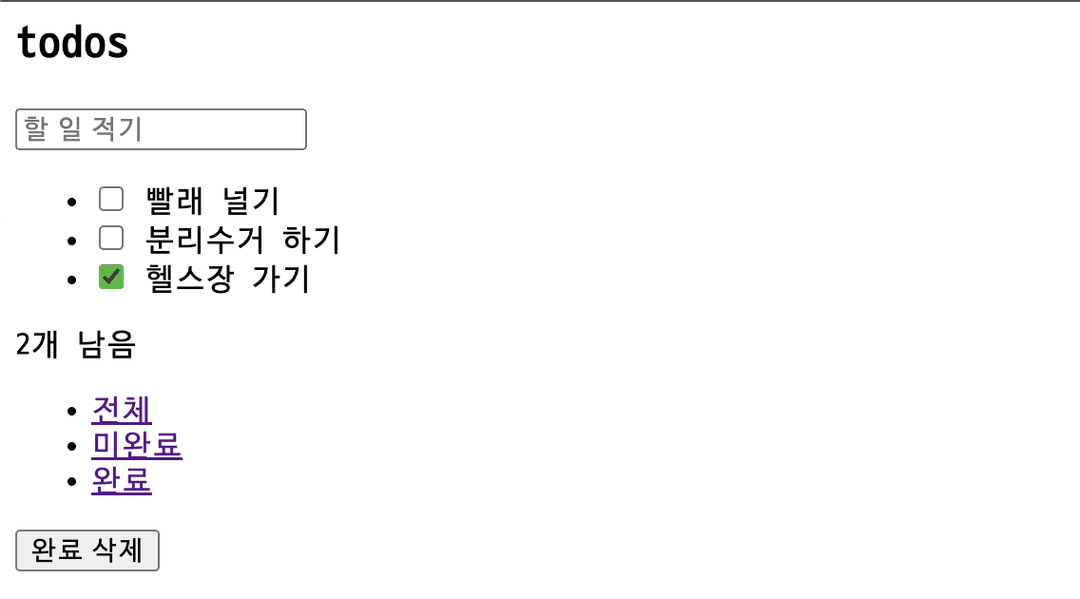
브라우저에서 상태에 맞게 그려진 할 일 목록을 볼 수 있다.
중간 리팩토링
기능은 아직이지만 기본적인 모양은 완성했다. 하지만 코드에서 리팩토링 신호를 포착할 수 있다. 일단 뷰 함수가 너무 거대하기 때문에 읽기 어렵다. 갱신할 뷰가 추가되면 코드가 더 복잡해지는 건 분명해 보인다. 게다가 개별 요소(todos, counter, filters)를 새로운 것으로 대체하는 작업, 즉 내부 로직은 다르지만 같은 유형의 작업을 수행하고 있다. 하나의 책임을 갖는 함수들로 분리하면 좋을 것 같다.
예를 들어 뷰 함수는 targetElement와 state를 받아 새로운 요소를 반환한다.
const viewFunction = (targetElement, state) => newElement;
아래 모양의 뷰 함수들로 분리했다.
const counterView = (targetElement, { todos }) => {
  const newCounter = targetElement.cloneNode(true);

  const howManyLeft = todos.filter(todo => !todo.completed).length;

  newCounter.textContent = `${howManyLeft}개 남음`;

  return newCounter;
}

const filterView = (targetElement, { filter: currentFilter }) => {
  const newFilters = targetElement.cloneNode(true);
  const filterList = newCounter.querySelectorAll('li a');

  [...filterList].forEach(filter => {
    if (filter.textContent === currentFilter) {
      filter.classList.add('selected');
    } else {
      filter.classList.remove('selected');
    }
  })

  return newFilters;
}

const todosView = (targetElement, { todos }) => {
  const newTodoList = targetElement.cloneNode(true);

  newTodoList.innerHTML = todos.map(({ text, completed }) => {
    return `
      <li ${completed ? 'class="completed"' : ''}>
        <div class="view">
          <input
            ${completed ? 'checked' : ''}
            class="toggle"
            type="checkbox">
          <label>${text}</label>
        </div>
      </li>
    `
  }).join('');

  return newTodoList
}

const appView = (targetElement, state) => {
  const element = targetElement.cloneNode(true)

  const list = element.querySelector('.todo-list')
  const counter = element.querySelector('.todo-count')
  const filters = element.querySelector('.filters')

  list.replaceWith(todosView(list, state))
  counter.replaceWith(counterView(counter, state))
  filters.replaceWith(filterView(filters, state))

  return element
}
소스 코드의 디렉토리, 파일만 잘 구분해도 설계는 확연하게 좋아질 수 있다. 관심사에 따라 디렉토리도 나눈다면 더 이해하기 쉬운 구조가 된다. 지금까지 작성한 코드가 컴포넌트 라이브러리의 초안이다.
root
├── views
│   ├── counterView.js
│   ├── FilterView.js
│   └── TodosView.js
│   └── Appview.js
├── index.html
└── index.js
컴포넌트 함수
컴포넌트 기반의 애플리케이션을 작성하려면 컴포넌트 간에 선언적인 방식으로 상호작용 해야 한다.
기존 appView()는 함수는 갱신이 필요한 뷰 함수를 직접 호출하고 있다. 이는 선언적 방식이라 할 수 없다.
const appView = (targetElement, state) => {
  const element = targetElement.cloneNode(true)

  const list = element.querySelector('.todo-list')
  const counter = element.querySelector('.todo-count')
  const filters = element.querySelector('.filters')

  list.replaceWith(todosView(list, state))
  counter.replaceWith(counterView(counter, state))
  filters.replaceWith(filterView(filters, state))

  return element
}
선언적 방식이라면 뭔가 '해 줘' 느낌이 나야 한다.

class 대신 data-component 속성에 컴포넌트의 이름을 넣는다. 이제부터 뷰에서 데이터 속성을 사용한다.
<html>
  <head>
    <title>todos</title>
  </head>
  <body>
    <section class="todoapp">
      <header>
        <h1>todos</h1>
        <input class="new-todo" placeholder="할 일 적기" autofocus>
      </header>
      <section class="main">
        <ul data-component="todos"></ul>
      </section>
      <footer class="footer">
        <span data-component="counter"></span>
        <ul data-component="filters">
          <li><a href="#/">전체</a></li>
          <li><a href="#/active">미완료</a></li>
          <li><a href="#/completed">완료</a></li>
        </ul>
        <button class="clear-completed">완료 삭제</button>
      </footer>
    </section>
    <script type="module" src="index.js"></script>
  </body>
</html>
컴포넌트 라이브러리를 위한 또 다른 필수 조건은 레지스트리로, 레지스트리는 앱에서 사용할 수 있는 모든 컴포넌트의 인덱스이다.
레지스트리 키는 data-component속성과 일치한다. 레지스트리를 사용하면 컴포넌트 안에서 다른 컴포넌트를 사용할 수 있다. 재사용성은 컴포넌트 기반 애플리케이션의 필수 요소다.
// 레지스트리 예시

const registry = {
  todos: Todos,
  counter: Counter,
  filters: Filters,
}
컴포넌트의 느낌을 내고 싶어 기존 뷰 함수의 이름을 PascalCase로 변경했다.
// components/Counter.js
const Counter = (targetElement, { todos }) => {
  const newCounter = targetElement.cloneNode(true);

  const howManyLeft = todos.filter(todo => !todo.completed).length;

  newCounter.textContent = `${howManyLeft}개 남음`;

  return newCounter;
}

// components/Filters.js
const Filters = (targetElement, { filter: currentFilter }) => {
  const newFilters = targetElement.cloneNode(true);
  const filterList = newCounter.querySelectorAll('li a');

  [...filterList].forEach(filter => {
    if (filter.textContent === currentFilter) {
      filter.classList.add('selected');
    } else {
      filter.classList.remove('selected');
    }
  })

  return newFilters;
}

// components/Todos
const Todos = (targetElement, { todos }) => {
  const newTodoList = targetElement.cloneNode(true);

  newTodoList.innerHTML = todos.map(({ text, completed }) => {
    return `
      <li ${completed ? 'class="completed"' : ''}>
        <div class="view">
          <input
            ${completed ? 'checked' : ''}
            class="toggle"
            type="checkbox">
          <label>${text}</label>
        </div>
      </li>
    `
  }).join('');

  return newTodoList
}
appView()의 구성은 더 이상 필요하지 않아 삭제하고, fetchTodos()는 apis.js로 분리했다. 그리고 레지스트리를 위한 공간인 registry.js를 추가한다.
root
├── apis.js
├── components
│   ├── Counter.js
│   ├── Filters.js
│   └── Todos.js
├── index.html
├── index.js
└── registry.js
먼저 레지스트리 등록을 위한 빈 객체를 만들어 두었다.
// registry.js

const registry = {};
addComponent()는 레지스트리에 컴포넌트를 등록한다. render()는 고차 함수로서 컴포넌트를 미리 받아 놓고 새로운 상태로 갱신된 엘리먼트를 반환한다.
// registry.js

export const addComponent = (name, component) => {
  registry[name] = render(component);
}
render()를 좀 더 살펴보면,
컴포넌트(기존 뷰 함수)를 실행시켜 새롭게 갱신된 엘리먼트를 리턴한다. 또한 data-component 속성을 갖는 모든 자식 요소를 찾는다. 만약 레지스트리에 등록된 요소라면 이를 갱신한다. 레지스트리에 등록된 컴포넌트는 render()로 래핑되어 targetElement과 state만 전달되면 lazy하게 실행될 준비가 되어있다. 재귀적 구성으로 루트만 렌더링하면 마지막 컴포넌트까지 모두 그린다.
// registry.js

const render = (component) => {
  return (targetElement, state) => {
    const element = component(targetElement, state);

    const children = element.querySelectorAll('[data-component]');

    [...children].forEach((target) => {
      const name = target.dataset.component;

      const component = registry[name];

      if (!component) return;

      target.replaceWith(component(target, state))
    })

    return element;
  }
}
renderRoot()는 최초 DOM 요소인 루트를 렌더링한다. render()는 data-component 속성을 가진 모든 자식 요소를 재귀적으로 갱신한다.
// registry.js

export const renderRoot = (root, state) => {
  const clone = (root) => {
    return root.cloneNode(true);
  }

  return render(clone)(root, state);
}
registry.js의 최종 모습은 아래와 같다.
// registry.js

const registry = {};

const render = (component) => {
  return (targetElement, state) => {
    const element = component(targetElement, state);

    const children = element.querySelectorAll('[data-component]');

    [...children].forEach((target) => {
      const name = target.dataset.component;

      const component = registry[name];

      if (!component) return;

      target.replaceWith(component(target, state))
    })

    return element;
  }
}

export const addComponent = (name, component) => {
  registry[name] = render(component);
}

export const renderRoot = (root, state) => {
  const clone = (root) => {
    return root.cloneNode(true);
  }

  return render(clone)(root, state);
}
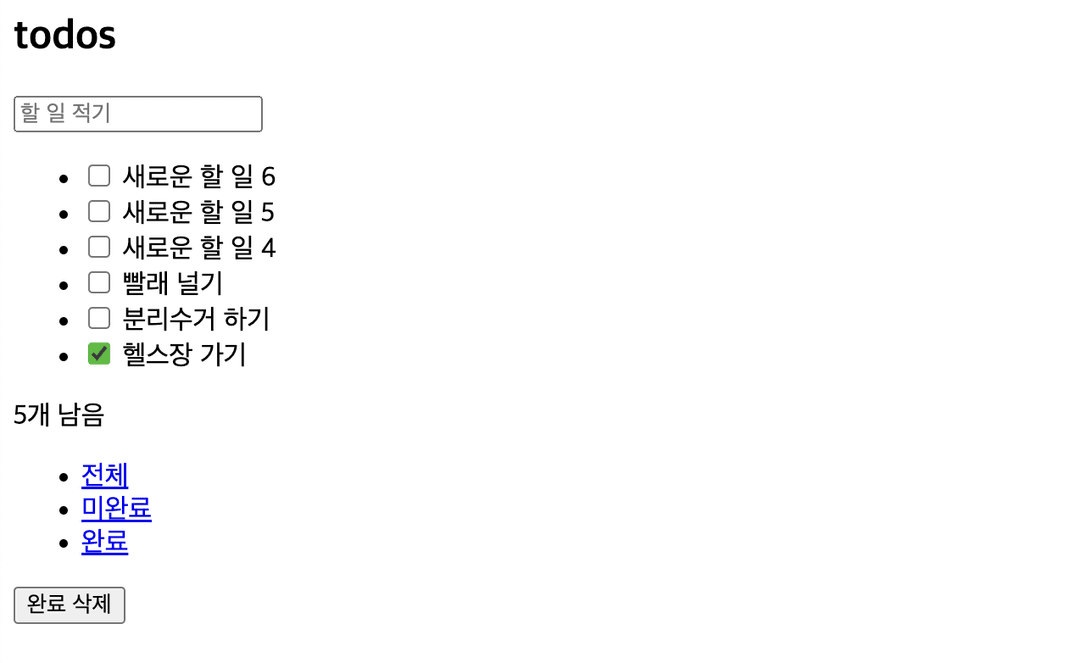
메인 컨트롤러에서 레지스트리에 컴포넌트를 등록하는 과정이 있다. 동적 렌더링을 가정하려고 5초마다 새로운 할 일이 추가된 목록을 그리도록 했다. (이처럼 특정 주기마다 가상 루트 요소를 만든 다음 실제 요소로 바꾸는 방법은 대규모 프로젝트에서 성능을 저하시킬 수 있다.)
// index.js

import { fetchTodos } from "./apis.js";

import Todos from './components/Todos.js';
import Filters from './components/Filters.js';
import Counter from './components/Counter.js';

import { addComponent, renderRoot } from './registry.js'

// set state
const state = {
  todos: fetchTodos(),
  filter: 'All'
}

// 레지스트리에 컴포넌트 등록
addComponent('todos', Todos);
addComponent('counter', Counter);
addComponent('filters', Filters);

// 동적 렌더링
const init = () => {
  window.requestAnimationFrame(() => {
    const app = document.querySelector('.todoapp');

    app.replaceWith(renderRoot(app, state))
  })
}

// 5초마다 새로운 할 일이 추가된다고 가정
window.setInterval(() => {
  const index = state.todos.length + 1;

  state.todos = [
    {
      id: `${index}`,
      text: `새로운 할 일 ${index}`,
      completed: false
    },
    ...state.todos,
  ]

  init();
}, 5000)

init();
5초마다 새로운 할 일이 추가된다.
가상 DOM
가상 DOM의 핵심은 비교 알고리즘이다. 더 이상 전체 목록을 교체하지 않고 변경된 요소가 실제 DOM에 필요한 유일한 작업이라는 사실을 시스템이 이해하도록 하는 것이 가상 DOM의 목적이다.
메인 컨트롤러에서 replaceWith 대신 diff 알고리즘을 사용한다.
// index.js

// ...

const init = () => {
  window.requestAnimationFrame(() => {
    const app = document.querySelector('.todoapp')
    const newApp = registry.createRoot(app, state)
    renderDiff(document.body, app, newApp)
  })
}

// ...
renderDiff는 부모 노드, 실제 노드, 가상 노드를 인자로 받아 재귀적으로 실행되는 함수다.
실제 노드는 존재하지만 가상 노드가 없다면 그 실제 노드는 삭제 대상이다.
// renderDiff.js

if (realNode && !virtualNode) {
    realNode.remove();
    return;
}
반대로 실제 노드는 없지만 가상 노드가 있다면 그 가상 노드는 추가 대상이다.
// renderDiff function

if (!realNode && virtualNode) {
    parentNode.appendChild(virtualNode);
    return;
}
두 노드가 모두 존재하는 경우 변경 사항이 있을 때만 실제 노드를 대체한다.
// renderDiff function

if (isNodeChanged(virtualNode, realNode)) {
    realNode.replaceWith(virtualNode);
    return;
}
isNodeChanged()는 아래 사항들을 확인한다.
attribute갯수가 다른가?- 하나 이상의
attribute가 변경되었는가? - 노드에 자식이 없다면 노드의
textContent가 다른가?
const isNodeChanged = (n1, n2) => {
  const { attributes: n1Attributes } = n1;
  const { attributes: n2Attributes } = n2;

  if (n1Attributes.length !== n2Attributes.length) {
    return true;
  }

  const hasDifferentAttribute = [...n1Attributes]
    .some(({ name }) => {
      const n1Attribute = n1.getAttribute(name);
      const n2Attribute = n2.getAttribute(name);

      return n1Attribute !== n2Attribute;
    })

  if (hasDifferentAttribute) {
    return true;
  }

  const hasChildren = n1.children.length !== 0 || n2.children.length !== 0;
  const isTextContentDifferent = !hasChildren && (n1.textContent !== n2.textContent);

  if (isTextContentDifferent) {
    return true
  }

  return false
}
전체 renderDiff()는 이런 모습이다.
const renderDiff = (
  parentNode,
  realNode,
  virtualNode
) => {
  if (realNode && !virtualNode) {
    realNode.remove();
    return;
  }

  if (!realNode && virtualNode) {
    parentNode.appendChild(virtualNode);
    return;
  }

  if (isNodeChanged(virtualNode, realNode)) {
    realNode.replaceWith(virtualNode);
    return;
  }

  const realChildren = [...realNode.children];
  const virtualChildren = [...virtualNode.children];

  const max = Math.max(realChildren.length, virtualChildren.length);

  for (let i = 0; i < max; i++) {
    renderDiff(
      realNode,
      realChildren[i],
      virtualChildren[i]
    )
  }
}
최종 디렉토리 구조는 이렇다.
root
├── apis.js
├── components
│   ├── Counter.js
│   ├── Filters.js
│   └── Todos.js
├── index.html
├── index.js
├── registry.js
└── renderDiff.js
렌더링 성능 모니터링
렌더링 엔진에서 중요한 요소 중 하나는 성능이다. 저자는 성능 모니터링을 위한 여러 도구를 소개한다.
- 크롬 개발자 도구 - Show frame per seconds meter 메뉴 선택
- stat.js 라이브러리 활용하기
- 커스텀 성능 위젯
let panel;
let start;
let frames;

const create = () => {
  const div = document.createElement('div');

  // create panel wrapper

  return div;
}

const tick = () => {
  frames++;

  const now = window.performance.now();

  if (now >= start + 1000) {
    panel.innerText = frames;
    frames = 0;
    start = now;
  }

  window.requestAnimationFrame(tick);
}

const init = (parent = document.body) => {
  panel = create();

  window.requestAnimationFrame(() => {
    start = window.performance.now();
    parent.appendChild(panel);
    tick();
  })
}

init();
출처
프란세스코 스트라츨로, 『프레임워크 없는 프론트엔드 개발』, 에이콘 출판(2021.01.21.)