싱글 페이지 애플리케이션
SPA는 하나의 HTML 페이지로 실행되는 애플리케이션이다. 사용자가 다른 화면으로 이동할 때 뷰를 동적으로 재구성하여 보여주기 때문에 사용자가 경험할 수 있는 지연을 감소시키고 일반적으로 더 나은 UX를 제공할 수 있다.
라우팅 시스템
라우팅 시스템은 SPA를 구축하는데 크게 기여한다. 라우팅 시스템은 최소 두 가지 요소를 갖는다.
- 경로 목록을 수집하는 레지스트리
- 현재 URL의 리스너
라우터는 URL이 변경될 때마다 해당 경로에 바인딩된 컴포넌트로 기존의 것을 대체한다.
프래그먼트 식별자를 이용한 라우터 구현
프래그먼트 식별자를 알기 위해선 URI(Uniform Resource Identifier)를 먼저 알아야 한다. URI란 인터넷 자원 식별자다. 여기서 인터넷 자원은 리소스, 즉 HTTP 요청 대상이다. URL은 우리가 가장 자주 접할 수 있는 URI 형식으로 포트, 도메인 네임, 경로, 쿼리 등과 같은 정보를 포함한다. 프래그먼트 식별자도 그 중 하나로 #으로 시작하는 부분이다. 프래그먼트는 웹 문서의 특정 섹션을 식별하는 목적으로 사용한다. 브라우저는 프래그먼트로 식별된 요소를 브라우저 뷰포트의 가장 상단으로 스크롤한다.
프래그먼트를 포함한 링크를 <nav />에 포함시킨다. 본문이 담길 컨테이너는 <main/>이 된다.
<html>
  <head>
    <link rel="shortcut icon" href="../favicon.ico" />
    <title>router</title>
  </head>
  <body>
    <nav>
      <a href="#/">home</a>
      <a href="#/about">about</a>
    </nav>
    <main></main>
    <script type="module" src="index.js"></script>
  </body>
</html>
각 페이지에 들어갈 내용이다.
// pages.js

export default container => {
  const home = () => {
    container.textContent = 'This is Home page'
  }

  const about = () => {
    container.textContent = 'This is About page'
  }

  const notFound = () => {
    container.textContent = 'Page Not Found !'
  }

  return {
    home,
    about,
    notFound
  }
}
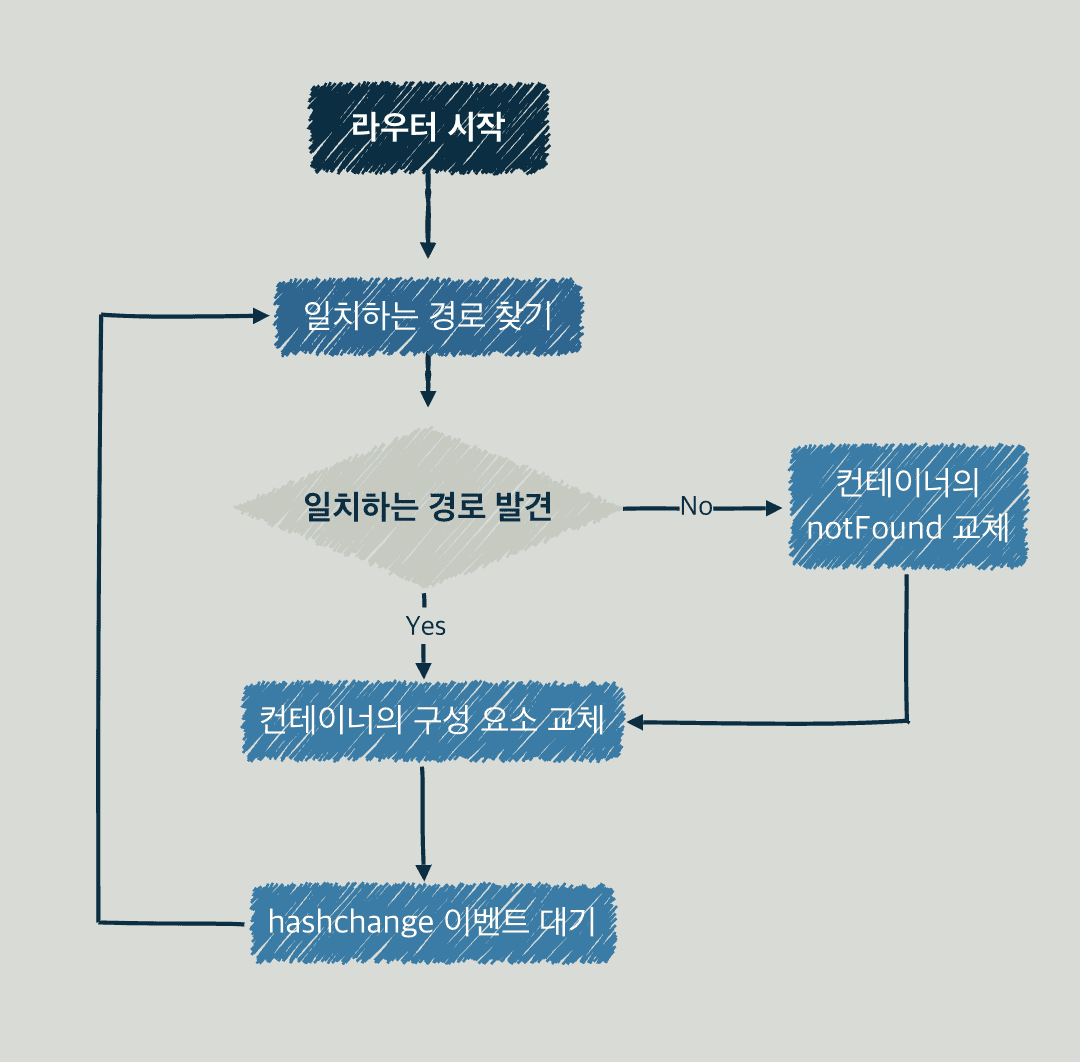
중요한 것은 라우터다. 처음 언급했듯이 URL 변경을 감지하는 리스너와 경로 목록이 담긴 레지스트리가 필요하다. start()는 checkRoutes()를 실행, 또한 hashchange이벤트에 대한 핸들러로 checkRoutes()를 할당한다.
// router.js

export default () => {
  const router = {};

  router.start = () => {
    window.addEventListener('hashchange', checkRoutes);

    if (!window.location.hash) {
      window.location.hash = '#/'
    }

    checkRoutes();
  }

  return router;
}
checkRoute()는 현재 주소가 레지스트리에 등록되었는지 검사한다. 만약 등록된 주소라면 해당 루트의 컴포넌트를 바인딩하고 그렇지 않다면 notFound()를 실행한다. setNotFound()로 notFound()를 위한 컴포넌트를 연결하지 않았다면 빈 객체를 리턴하기 때문에 화면에는 아무 일도 일어나지 않는다.
// router.js

export default () => {

  // ... 생략

  const routes = [];

  const checkRoutes = () => {
    const currentRoute = routes.find(route => {
      return route.fragment === window.location.hash;
    })

    if (!currentRoute) {
      notFound();
      return;
    }

    currentRoute.component();
  }

  let notFound = () => {};

  router.setNotFound = cb => {
    notFound = cb;
    return router;
  }

  return router;
}
router의 마지막 메서드로 레지스트리 등록을 위한 addRoutes()를 추가한다.
export default () => {
  const router = {};

  router.start = () => {
    window.addEventListener('hashchange', checkRoutes);

    if (!window.location.hash) {
      window.location.hash = '#/'
    }

    checkRoutes();
  }

  const routes = [];

  const checkRoutes = () => {
    const currentRoute = routes.find(route => {
      return route.fragment === window.location.hash;
    })

    if (!currentRoute) {
      notFound();
      return;
    }

    currentRoute.component();
  }

  router.addRoutes = routeList => {
    Object.entries(routeList).map(([fragment, component]) => {
      routes.push({ fragment, component });
    })

    return router;
  }

  let notFound = () => { };

  router.setNotFound = cb => {
    notFound = cb;
    return router;
  }

  return router;
}
컨트롤러에서 경로 레지스트리를 구성한다.
import createPage from './pages.js';
import createRouter from './router.js';

const container = document.querySelector('main');

const pages = createPage(container);

const router = createRouter();

const routes = {
  '#/': pages.home,
  '#/about': pages.about,
}

router
  .addRoutes(routes)
  .setNotFound(pages.notFound)
  .start();
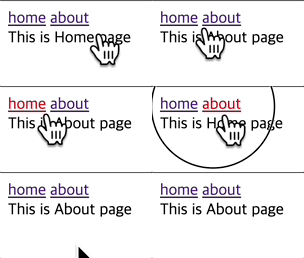
동작하는 해시 라우터
정규식을 통한 경로 매개변수 추출
경로 매개변수(path parameter)는 URL에서 리소스를 식별해야 할 때 사용한다.
다음 경로에서 123은 유저의 식별자다.
https://example.com/users/123
이를 id라는 매개변수로 표현한다.
https://example.com/users/:id
매개변수를 갖는 경로를 레지스트리에 등록한다.
const routes = {
  '#/': pages.home,
  '#/about': pages.about,
  '#/users': pages.users,
  '#/users/:id': pages.userDetail,
  '#/users/:id/:anotherId': pages.userAnotherDetail,
  '#/users/:id/:anotherId/:theOtherId': pages.userTheOtherDetail,
}
매개변수를 포함한 경로에 매핑하는 컴포넌트는 인자를 받는다.
export default container => {
  // ...

  const users = () => {
    container.textContent = 'This is Users page'
  }

  const userDetail = ({ id }) => {
    container.textContent = `This is User Detail Page with ID: ${id}`
  }

  const userAnotherDetail = ({ id, anotherId }) => {
    container.textContent = `This is User Another Detail Page with ID: ${id}, another ID: ${anotherId}`
  }

  const userTheOtherDetail = ({ id, anotherId, theOtherId }) => {
    container.textContent = `This is User Another Detail Page with ID: ${id}, another ID: ${anotherId}, theOtherId: ${theOtherId}`
  }

  // ...
}
addRoutes()는 이제 경로를 그대로 푸시하는 대신 경로 매개변수를 담는 리스트인 params와 경로 탐색을 위한 정규표현식인 testRegExp을 반환한다.
router.addRoutes = routeList => {
  Object.entries(routeList).map(([fragment, component]) => {
    const params = [];

    // ... 중략

    routes.push({ component, params, testRegExp });
  })

  return router;
}
replace()는 어떤 패턴에 일치하는 일부, 또는 모든 부분이 교체된 새로운 문자열을 반환한다. 어떤 경우에 일부를 교체하고, 또는 모두를 교체할까? 만약 첫 번째 인자가 문자열이라면 첫 번째로 일치하는 문자열만을 교체한다. 만약 일치하는 모두를 교체하고 싶다면 replaceAll()을 사용해야 한다.
const newStr = str.replace(regexp|substr, newSubstr|function)
한편, 첫 번째 인자가 정규식이라면 정규식의 플래그에 따라 일치하는 부분을 일부 또는 모두 교체한다. 두 번째 인자로는 대체 문자열 또는 함수를 받는다. 만약 함수라면 함수의 첫 번째 인자로 매치된 문자열, 두 번째 인자부터는 정규 표현식의 캡쳐 그룹에 속한 문자열이 주어진다. 이외에도 매치된 문자열의 index, 조사된 전체 문자열을 매개변수로 갖는다. 자세한 내용은 MDN을 참고하자. 이 함수의 매개변수 갯수는 정규식에 따라 달라진다는 점에 유의하자.
parsedFragment는
fragment에서/:(\w+)/정규 표현식을 활용하여 각 경로의 매개변수를 찾는다.- 각 경로 매개변수를
params에 담는다. - 각 경로 매개변수를 또 다른 정규 표현식을 문자열로 나타낸
'([^\\/]+)'로 대체한다. /를\/로 대체한다.
최종 문자열에 행의 시작과 끝을 나타내는 앵커를 붙인 후 새로운 정규표현식 testRegExp을 생성한다.
router.addRoutes = routeList => {
  const ROUTE_PARAMETER_REGEXP = /:(\w+)/g;
  const URL_FRAGMENT_REGEXP = '([^\\/]+)';

  Object.entries(routeList).map(([fragment, component]) => {
    const params = [];

    const parsedFragment = fragment
      .replace(ROUTE_PARAMETER_REGEXP, (_, param) => {
        params.push(param);

        return URL_FRAGMENT_REGEXP;
      })
      .replace(/\//g, '\\/');

    const testRegExp = new RegExp(`^${parsedFragment}$`);

    routes.push({ component, params, testRegExp });
  })

  return router;
}
만약 fragment가 #/users/:id/:anotherId라면
id와anotherId를params에 담는다.- 매개변수는
'([^\\/]+)'가 대체하여#/users/([^\\/]+)/([^\\/]+)와 같은 모양이 된다. /를 대체하면#\/users\/([^\\/]+)\/([^\\/]+)이 된다.- 최종적으로
testRegExp는^#\/users\/([^\\/]+)\/([^\\/]+)$와 같은 정규 표현식이 된다.
이제 hashChange이벤트가 발생하면, routes를 순회하며 각 route의 유효성을 검증하고 extractUrlParams()를 통해 해당 루트에 필요한 파라미터를 추출한다.
const checkRoutes = () => {
  const { hash } = window.location;

  const currentRoute = routes.find(route => {
    const { testRegExp } = route;

    return testRegExp.test(hash);
  })

  if (!currentRoute) {
    notFound();
    return;
  }

  const urlParams = extractUrlParams(currentRoute, hash);

  // ...
}
extractUrlParams()는 정규 표현식으로 실제 주소에서 파라미터에 대응하는 값을 추출한다. 만약, users/:id/:anotherId의 형식에 users/1/2와 같은 실제 주소라면 { id: 1, anotherId: 2}를 반환한다.
const extractUrlParams = (route, hash) => {
  if (route.param?.length === 0) {
    return {}
  }

  const params = {};

  const matches = hash.match(route.testRegExp);

  matches.shift();

  matches.forEach((paramValue, index) => {
    const paramName = route.params[index];

    params[paramName] = paramValue;
  })

  return params;
}
컴포넌트에 추출한 파라미터를 넣고 실행한다.
const checkRoutes = () => {
  const { hash } = window.location;

  const currentRoute = routes.find(route => {
    const { testRegExp } = route;

    return testRegExp.test(hash);
  })

  if (!currentRoute) {
    notFound();
    return;
  }

  const urlParams = extractUrlParams(currentRoute, hash);

  currentRoute.component(urlParams);
}
동작하는 매개변수 탐색

히스토리 API를 이용한 라우터
히스토리 라우터는 프래그먼트 식별자를 사용하지 않는다.
<html>
  <head>
    <link rel="shortcut icon" href="../favicon.ico" />
    <title>router</title>
  </head>
  <body>
    <nav>
      <a data-navigation href="/">home</a>
      <a data-navigation href="/about">about</a>
      <a data-navigation href="/users">users</a>
      <a data-navigation href="/users/1">user(1)</a>
      <a data-navigation href="/users/1/2">user(1)-2</a>
      <a data-navigation href="/users/3/4/5">user(3)-4-5</a>
    </nav>
    <main></main>
    <script type="module" src="index.js"></script>
  </body>
</html>
링크를 클릭할 때 기대하는 동작은 해당 경로에 매핑된 구성을 보여주는 것이다. 하지만 링크 요소를 클릭하는 경우 실제 주소에 요청을 날리기 때문에 404 에러가 발생한다. 이런 이유로 data 속성으로 네비게이션 속성을 갖는 a태그를 식별하고 클릭 이벤트의 기본 동작을 방지하는 방식을 사용한다. 그리고 URL의 변경되는 것을 감지할 수 있는 DOM 이벤트가 없기 때문에 setInterval()을 사용하여 변경을 주기적으로 확인한다.
const TICKTIME = 250;
const NAVIGATION = 'a[data-navigation]';

router.start = () => {
  checkRoutes();

  window.setInterval(checkRoutes, TICKTIME)

  document.body.addEventListener('click', (e) => {
    const { target } = e;

    if (target.matches(NAVIGATION)) {
      e.preventDefault();
      router.navigate(target.href);
    }
  })
}
경로도 프래그먼트 식별자 없이 정의한다.
const routes = {
  '/': pages.home,
  '/about': pages.about,
  '/users': pages.users,
  '/users/:id': pages.userDetail,
  '/users/:id/:anotherId': pages.userAnotherDetail,
  '/users/:id/:anotherId/:theOtherId': pages.userTheOtherDetail,
}
동작하는 히스토리 라우터

출처
프란세스코 스트라츨로, 『프레임워크 없는 프론트엔드 개발』, 에이콘 출판(2021.01.21.)